Professional Budget Format

Need to create a quote now?
Generate professional quotes in less than 2 minutes with our AI-powered tool.
Creating budgets can become a tedious task and a waste of time if you don’t have a clear and optimized structure. Many professionals and entrepreneurs spend hours creating documents from scratch, unaware that there are budget spreadsheets and pre-designed models that can save them valuable time.
In this article, you will discover how to choose the right budget format for your business, learn to create one step by step, and get to know the best tools and templates available (both free and premium) to automate this essential process.
What is a budget and how is it different from a quote?
Before diving into formats and templates, it is important to clarify what exactly a budget is and how it differs from a quote, as these terms are often confused.
A budget is a formal document that estimates the total cost of a project, job, or service. It generally includes a detailed breakdown of expenses, materials, work hours, and other resources needed to complete the requested work.
| Budget | Quote |
|---|---|
| - Higher level of detail and precision - Involves deeper prior study - Usually includes legal terms - Generally binding - Common in complex or construction projects |
- Simpler and more direct - Quick response to a price request - Less legally binding - Focused mainly on prices - Common in product sales or standard services |
The main differences between budget and quote lie in their level of detail, legal commitment, and purpose:
| Element | Description |
|---|---|
| Level of detail | A budget is usually more exhaustive, including cost breakdowns, work phases, and technical specifications |
| Legal value | The budget generally has greater contractual value and may be considered binding in many legal contexts |
| Purpose | The quote seeks to offer a quick price, while the budget seeks to plan resources and costs in a structured way |
“A well-structured budget not only informs about costs, but communicates professionalism and attention to detail, significantly increasing the chances that the client will approve the project.”
Types of budget formats (Excel, PDF, online)
There are various formats for creating and presenting budgets. Each has specific advantages depending on the type of business and particular needs:
1. Budget spreadsheets in Excel
Excel budget spreadsheets are one of the most popular options due to their flexibility and ease of use, especially for those already familiar with this tool.
Advantages:
- Easy customization of formulas and automatic calculations
- Wide availability of free budget spreadsheets in Excel
- Ability to create multiple sheets for different sections
- Familiarity for many users
Disadvantages:
- Aesthetic and professional design limitations
- Potential compatibility issues between versions
- Difficulty sharing and tracking online
2. Budget format in PDF
PDF budget formats are ideal for professional presentations and formal client delivery.
Advantages:
- Professional and consistent appearance on any device
- Impossibility of modification by the client (security)
- Inclusion of visual elements like logos and high-quality images
- Easy to print while maintaining exact format
Disadvantages:
- Difficulty making changes once generated
- No automatic calculations
- Need for additional software for creation (Word, InDesign, etc.)
3. Online tools for generating budgets
Web applications for creating budgets represent the most advanced and efficient solution available today.
Advantages:
- Access from any device with internet
- Pre-designed professional templates
- Automation of calculations and processes
- Integration with CRM and other business tools
- Status tracking (sent, viewed, accepted)
- Automatic conversion to other formats (PDF, Excel)
Disadvantages:
- Possible subscription cost for advanced features
- Need for internet connection
- Initial learning curve (though usually minimal)
Professional recommendation: The current trend clearly favors online tools for their combination of professionalism, efficiency, and tracking capabilities. However, for very specific or complex projects, a combination of Excel (for detailed calculations) and PDF (for presentation) may be suitable.
How to create a budget step by step
Regardless of the format you choose, creating an effective budget follows a structured process that ensures the inclusion of all necessary elements:
1. Gather detailed information
Before starting to draft your budget, you need clarity on:
- Client’s exact requirements
- Project or service scope
- Materials and resources needed
- Estimated execution time
- Fixed and variable costs
2. Structure your budget model
Every professional budget format should include these elements:
| Element | Description |
|---|---|
| Professional header | Logo, contact information, and tax data |
| Client data | Name, address, contact person |
| Budget number and date | For tracking and reference |
| Budget validity | Period during which prices remain valid |
| Detailed description | Clear explanation of products/services offered |
| Cost table | Breakdown by item with quantities and unit prices |
| Subtotals and total | Clearly highlighted |
| Applicable taxes | VAT or other relevant taxes |
| Conditions and terms | Payment method, delivery times, guarantees |
| Additional notes | Exclusions, clarifications, or supplementary information |
| Space for signatures | If formal approval is required |
3. Calculate costs accurately
For a service budget model, consider these elements:
| Element | Description |
|---|---|
| Work hours | Calculate accurately the time required |
| Hourly rate | Establish differentiated rates by type of work |
| Associated expenses | Materials, software, subcontracting |
| Operating costs | Percentage of your business overhead |
| Profit margin | Clear percentage over total cost |
4. Personalize the presentation
An effective budget is not only accurate but also visually professional:
- Use your visual identity (colors, typography)
- Structure information clearly and hierarchically
- Visually highlight key elements like the total price
- Consider including illustrative images for products or expected results
5. Practical example: Budget model for web design services
digital CREATIVE STUDIO 123 Main Street 28001 Madrid, Spain info@studiocreative.com
BUDGET #2025-042 Date: 20/05/2025 Valid until: 20/06/2025
Client: Aroma Cafeteria Att. Laura Martinez 456 Secondary Ave. laura@aromacafeteria.com
Project description: Design and development of responsive website for Aroma Cafeteria, including homepage, digital menu, “About us” section, image gallery, and contact form.
| Item | Quantity | Unit Price | Total |
|---|---|---|---|
| UI/UX design | 1 | $800 | $800 |
| Responsive frontend development | 1 | $1,200 | $1,200 |
| CMS integration for content management | 1 | $600 | $600 |
| Basic SEO optimization | 1 | $400 | $400 |
| Subtotal: | $3,000 | ||
| VAT (21%): | $630 | ||
| TOTAL: | $3,630 | ||
Conditions:
- Payment: 40% upfront, 60% upon delivery
- Execution time: 4 weeks from approval
- Includes 2 rounds of revisions per section
To accept this budget, sign below and send a copy to info@studiocreative.com
[Client signature] [Date]
This example of a budget for web design services illustrates how to structure information clearly and professionally, breaking down each item and specifying conditions transparently.
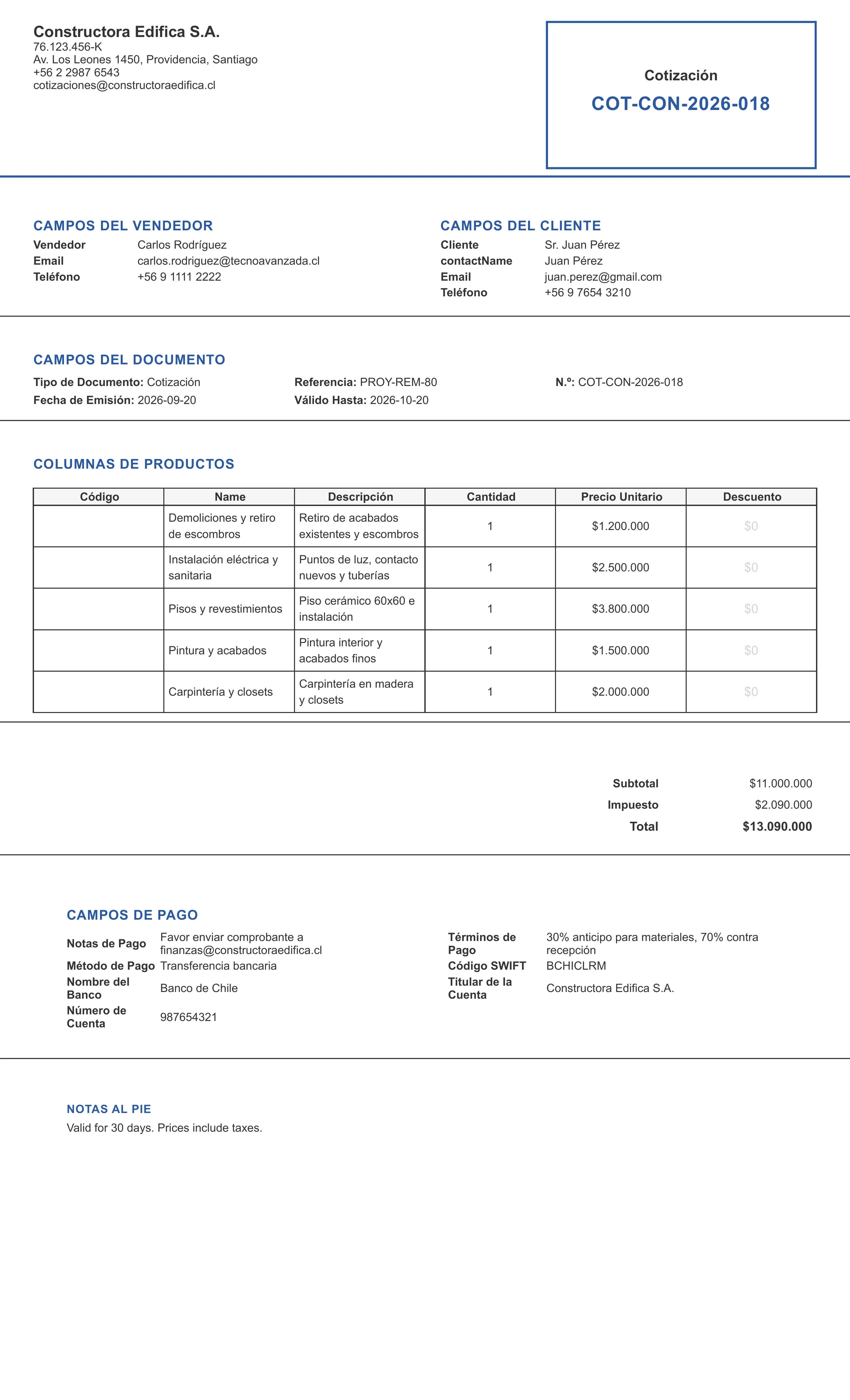
Professional budget quote generated with the system
This is how a professional budget looks when created with our generator: a structured document with the issuer and client data, the cost table, taxes, and payment conditions ready to send.
Recommended tools and templates
There are multiple resources you can use to create professional budgets without starting from scratch:
Free downloadable templates
For those who prefer to work with traditional tools:
| Element | Description |
|---|---|
| Free budget spreadsheets in Excel | Available through Microsoft Office Templates or sites like Canva |
| PDF budget formats | Downloadable from platforms like Template.net or Freepik |
| Budget models for specific services | Adapted to different industries such as construction, consulting, or marketing |
Specialized software
For more advanced and professional needs:
| Element | Description |
|---|---|
| QuickBooks | Comprehensive accounting solution that includes budgets |
| Zoho Invoice | Specific tool for invoicing and budgets |
| Wave | Free alternative with basic but effective functionalities |
Online tools with artificial intelligence
The new generation of tools for generating budgets online:
Revolution in budget creation
Related articles
AI platforms like formatocotizacion.com are transforming the way professionals create budgets:
- Automatically generate personalized content
- Adapt language according to client type and sector
- Suggest competitive prices based on market data
- Automate complex calculations and prevent human errors
- Offer professional designs without design knowledge
The advantages of using a specialized tool to generate budgets online include:
| Element | Description |
|---|---|
| Significant time savings | What used to take hours is reduced to minutes |
| Consistent professionalism | Every budget maintains the same quality |
| Effective tracking | You know exactly when the client sees your budget |
| Direct conversion to other documents | From accepted budget to invoice in one click |
| Effectiveness analysis | Data on which budgets convert best |
“Professionals and companies that use automated tools for their budgets experience an average increase of 27% in their conversion rate, mainly due to response speed and professionalism perceived by clients.”
Budget examples for freelancers
If you are a freelancer, you can find specific models for your profession:
| Element | Description |
|---|---|
| Graphic designers | With sections for copyright and permitted uses |
| Web developers | Including maintenance and updates |
| Consultants | With structure by phases or deliverables |
| Photographers | Specifying formats, quantity of images, and licenses |
| Writers | With rates per word, page, or project |
Conclusion
A well-structured budget format is much more than a simple document with figures: it is a powerful sales and professionalization tool. Whether you opt for a free Excel budget spreadsheet, a PDF format, or a specialized online tool, the important thing is that your budget clearly communicates the value of your offer.
If you are still creating budgets manually or using basic templates, consider that the time invested in that process could be limiting your ability to serve more clients or improve your services.
Modern solutions like online budget generation tools not only optimize your workflow but can make a significant difference in the professional perception of your brand and, consequently, in your conversion rate.
Want to generate PDF budgets without complications?
Try formatocotizacion.com for free and create professional proposals in seconds.
Frequently asked questions
What is the difference between a budget and a quote?
A budget is more detailed and has greater contractual value, including cost breakdown, phases, and technical specifications. A quote is simpler, focused mainly on prices and with less legal binding, used for quick responses to price requests.
Is it better to make budgets in Excel, PDF, or use online tools?
It depends on your needs. Excel offers flexibility for calculations but design limitations; PDF provides professional presentation but makes modifications difficult; online tools combine the best of both with advanced tracking and automation features.
What elements are essential in a professional budget?
Every budget should include: header with your company data, client information, budget number and date, validity, detailed description of products/services, cost table, subtotals and total, taxes, payment and delivery conditions, and space for signatures.
Are there free budget templates I can use?
Yes, there are numerous free budget spreadsheets in Excel available on platforms like Microsoft Office Templates, Canva, or Template.net, as well as downloadable PDF budget formats. There are also online tools with limited free versions.
How can I make my budget stand out from the competition?
To make your budget stand out: personalize it with your visual identity, include testimonials from satisfied clients, highlight value and benefits (not just prices), offer options or packages, add clear guarantees, and use a professional design with a clear and well-organized structure.