Quote Spreadsheet in Excel

Need to create a quote now?
Generate professional quotes in less than 2 minutes with our AI-powered tool.
A quote spreadsheet in Excel is the most efficient tool for creating quotes with automatic calculations. With the right formulas, subtotal, VAT and final total calculate themselves, eliminating manual errors and saving time on each quote.
In this complete guide we teach you how to create your own quote spreadsheet in Excel from scratch, with formulas, professional format and a step-by-step example you can copy and adapt.
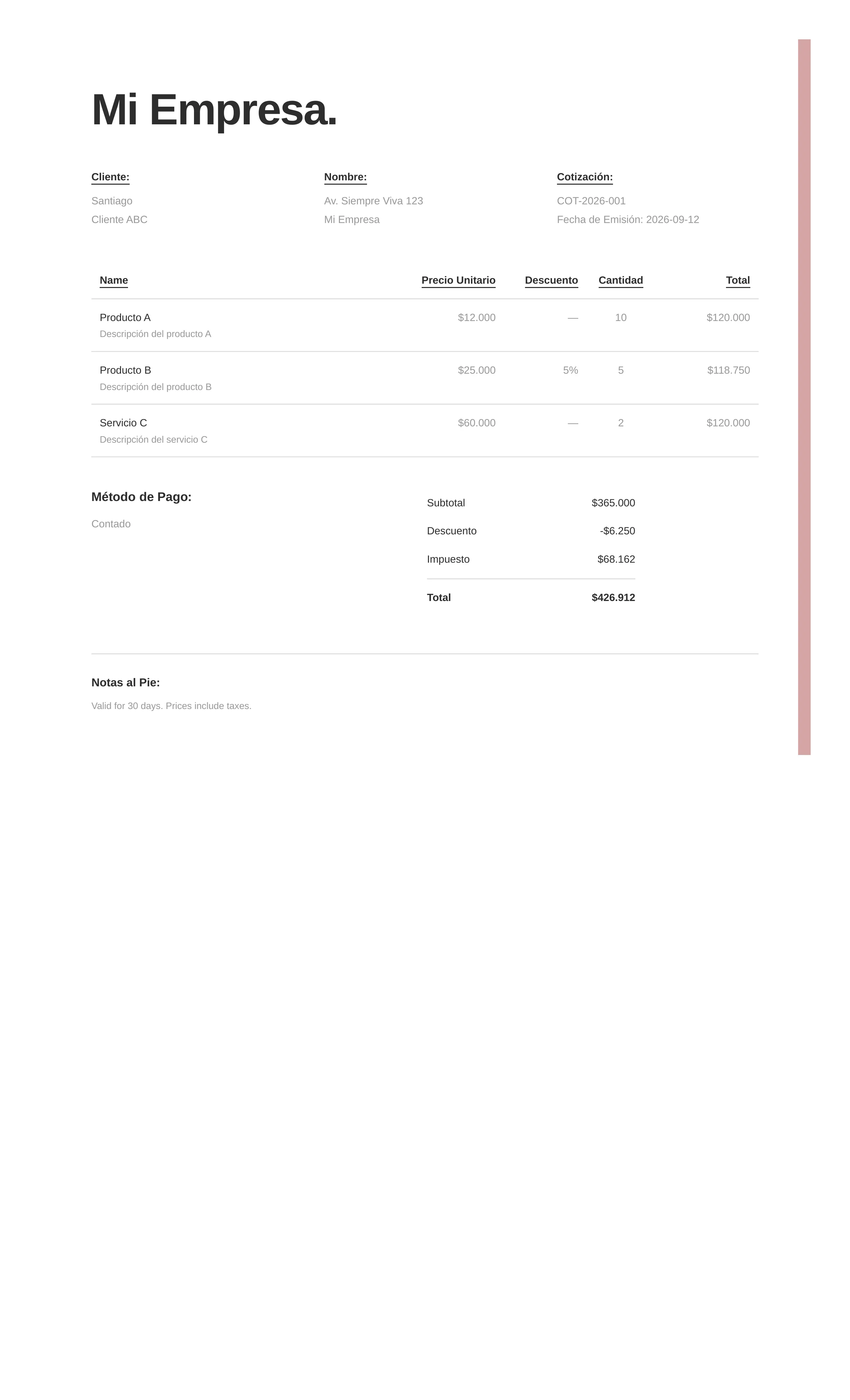
Excel quote spreadsheet example generated with the system
This is what a quote spreadsheet looks like when created with our generator: a structured table with automatic formulas for line totals, subtotal, VAT, and the final total.
Why use Excel for quotes
Excel offers unique advantages for quote creation: automatic formulas, multiple sheets, charts and the ability to create reusable templates. Unlike Word, Excel calculates totals without you having to do anything manually.
Main advantages
| Feature | Benefit |
|---|---|
| Automatic formulas | Instant calculation of subtotals, VAT and totals |
| Multiple sheets | Organize quotes by client or project |
| Cell protection | Prevent accidental formula modifications |
| Conditional formatting | Highlight special prices or discounts |
| Reusable templates | Save time on future quotes |
Basic structure of a quote spreadsheet
Before creating formulas, you need to define the sheet structure. Here is the recommended layout:
Company header (rows 1-4)
- Row 1: Company logo (Insert > Image)
- Row 2: Company name
- Row 3: Address, phone and email
- Row 4: Tax ID or identification number
Quote data (rows 5-8)
- Row 5: Quote number (e.g., QUO-2026-001)
- Row 6: Issue date
- Row 7: Expiration date
- Row 8: Client name
Products table (row 10 onwards)
The table should have the following columns:
| Column | Content | Format |
|---|---|---|
| A | Line number | Integer |
| B | Concept or product | Text |
| C | Description | Text |
| D | Unit of measurement | Text (pc, kg, m, etc.) |
| E | Quantity | Number |
| F | Unit price | Currency |
| G | Discount (%) | Percentage |
| H | Line total | Formula |
Create the quote spreadsheet step by step
Step 1: Set up the Excel book
Open Excel and create a new book. Save the file with a descriptive name like “Quote Template 2026.xlsx”.
Step 2: Design the header
Select cells A1 to H1 and click Merge and Center. Type your company name. Repeat for address and contact information in rows 2 and 3.
Step 3: Create the products table
In row 10, write the column headers:
A10: No.
B10: CONCEPT
C10: DESCRIPTION
D10: UNIT
E10: QUANTITY
F10: UNIT PRICE
G10: DISCOUNT %
H10: TOTAL
Step 4: Add the formulas
In row 11, write the following formulas:
-
Cell H11 (Line total):
=E11*F11*(1-G11)This formula multiplies quantity by unit price and applies the discount. -
Cell E25 (Subtotal):
=SUM(H11:H24)Adds all line totals. -
Cell E26 (VAT 16%):
=E25*0.16Calculates 16% VAT on the subtotal. -
Cell E27 (Final total):
=E25+E26Adds subtotal plus VAT.
Step 5: Format as currency
Select columns F and H. Go to Home > Number > Currency. This will format values with the $ sign and two decimal places.
Step 6: Protect the formulas
Go to Review > Protect Sheet. Check the “Select unlocked cells” box and set a password. This prevents formulas from being accidentally modified.
Complete quote spreadsheet example
Here is a complete example with test data:
[Logo]
Constructora Edifica S.A. de C.V.
Av. Reforma 123, Col. Centro, CDMX
Tel: +52 55 1234-5678 | ventas@edifica.com.mx
Tax ID: EDI850101AB3

QUOTE: QUO-2026-028
Date: 08/05/2026
Valid until: 08/20/2026
Client: Ing. Roberto Martinez
Company: Desarrollos Inmobiliarios del Norte

| No | Concept | Description | Unit | Qty | Unit Price | Disc. | Total |
|----|---------|-------------|------|-----|------------|-------|-------|
| 1  | Steel bar | Corrugated 3/8" x 12m | pc | 100 | $185.00 | 0% | $18,500.00 |
| 2  | Cement | CPC 30R 50kg | bag | 200 | $245.00 | 5% | $46,550.00 |
| 3  | Sand | Washed river | m3 | 10 | $850.00 | 0% | $8,500.00 |
| 4  | Gravel | Crushed 3/4" | m3 | 8 | $900.00 | 0% | $7,200.00 |
| 5  | Block | Concrete 15x20x40 | pc | 500 | $12.50 | 0% | $6,250.00 |
| 6  | Shipping | Transport to site | trip | 3 | $2,500.00 | 0% | $7,500.00 |

Subtotal: $94,500.00
VAT (16%): $15,120.00
TOTAL: $109,620.00

CONDITIONS:
- Payment: 50% advance, 50% against delivery
- Delivery: 5 business days after order confirmed
- Warranty: manufacturer's specifications
- Validity: 15 calendar days
Advanced formulas for your quote spreadsheet
Volume discount
If you offer quantity discounts, you can use a conditional formula:
=IF(E11>=100, 0.10, IF(E11>=50, 0.05, 0))This formula applies 10% discount if quantity is greater than or equal to 100, 5% if greater than or equal to 50, and 0% otherwise.
Multiple currencies
If you quote in different currencies, create a cell with the exchange rate and use absolute references:
=H11*$K$1Where K1 contains the daily exchange rate.
Quantity price table
For tiered pricing, use VLOOKUP:
=VLOOKUP(E11, $A$30:$B$35, 2, TRUE)This looks up the unit price based on the requested quantity in a reference table.
Common mistakes in quote spreadsheets
Not protecting formulas
If you don’t protect cells with formulas, any user can accidentally modify them and cause calculation errors.
Forgetting to update prices
A template with old prices generates incorrect quotes. Set a quarterly reminder to update prices.
Not including VAT
Forgetting VAT can cause tax issues. Always include a line for taxes.
Sending in editable format
Never send the Excel sheet directly. Always convert to PDF before sending to the client.
Not adjusting the print area
If the quote doesn’t fit on one page when printing, adjust margins and print area from File > Print > Page Setup.
Download our free template
We have an Excel quote spreadsheet template ready to download and customize. Includes all formulas, professional format and cell protection.
Frequently asked questions
Can I use Google Sheets instead of Excel?
Yes, Google Sheets works the same way. The formulas are the same. The advantage is that you can share and collaborate in real time.
How do I send the quote by email?
Convert to PDF (File > Save As > PDF) and attach it to the email. Write a brief introductory message in the email body.
What do I do if I need to add more lines?
Simply insert new rows before the subtotal line. Formulas will update automatically if you copy the formula from the previous row.
Can I add charts to my quote?
Yes. Select the data and go to Insert > Chart. Bar or pie charts are useful for summarizing cost distribution.
How do I create an automatic quote number?
In a separate cell, use =COUNTA($B$11:B11)+1 to generate automatic sequential numbers.
Frequently asked questions
How do I make a quote spreadsheet in Excel?
Open a new Excel book, create a header with your company data, design a table with columns for concept, description, quantity, unit price and total. Add formulas to calculate subtotals (=quantity*price) and VAT (=subtotal*0.16). Format cells as currency and save the template.
What formulas should I use in my quote spreadsheet?
Essential formulas are: =C5*D5 for line total (quantity times unit price), =SUM(E5:E20) for subtotal, =H5*0.16 for VAT, and =H5+H6 for final total. You can add discount formulas like =H5*0.05 if you offer volume discounts.
Can I protect my quote spreadsheet in Excel?
Yes. Go to Review > Protect Sheet and set a password. This prevents formulas from being modified. You can also protect only cells with formulas while leaving data cells editable.
How do I convert my Excel spreadsheet to PDF?
Go to File > Save As and select PDF. You can also go to File > Print and choose Save as PDF as printer. Make sure to adjust the print area to fit on one page.
How many lines should I leave in my quote spreadsheet?
Leave at least 15 to 20 empty lines for products or services. If you handle many items, create a second sheet or use a pivot table that expands automatically.